
Family organisation with AI: how kiimu takes the small jobs off your hands
By Mario Deubler ·
I'm Mario. I build mapumi, and together with my co-founder I build kiimu. So I am presenting my own product here, and for every example I say what already works and what does not yet.
Sunday evening, and our daughter is finally asleep. My partner and I sit on the sofa with a laptop and a phone and go through the week. Who is doing pick-up on Wednesday? What are we cooking? Grandma has already asked twice what the little one wants. And somewhere between the shopping list and the parents' evening, one of us remembers that the library books were due back on Friday.
None of this is hard. It is just a great many small things, and they all land on the two of us on the same evening.
Maybe you know mapumi from the travel game or the wish list. kiimu is actually meant for work. At home, though, I also use it for exactly these Sunday evenings, and that is what I want to tell you about.
What kiimu is

kiimu gives everyone their own personal assistant. You write to it in a chat, just like you write to your partner. It learns from what you tell it and remembers your rules, the way a new colleague would after the first few weeks. For regular tasks there are small helpers, for example one that plans the week's meals every Thursday.
The idea behind it: the assistant does the small jobs, and you make the decisions. Before it sends an email, kiimu shows you a card that you approve with one tap. It never orders or books anything itself; it only prepares.
Two things I would rather say right away, so you are not disappointed. kiimu is currently in a closed beta. And it runs on an AI subscription you already have, for example from Claude. Without such a subscription it does not work at the moment.
I will show you what this looks like in my everyday life with six examples. Some of it kiimu can already do, some of it runs for me as my own small setup, and some of it is still to come.
A wish list the whole family can see
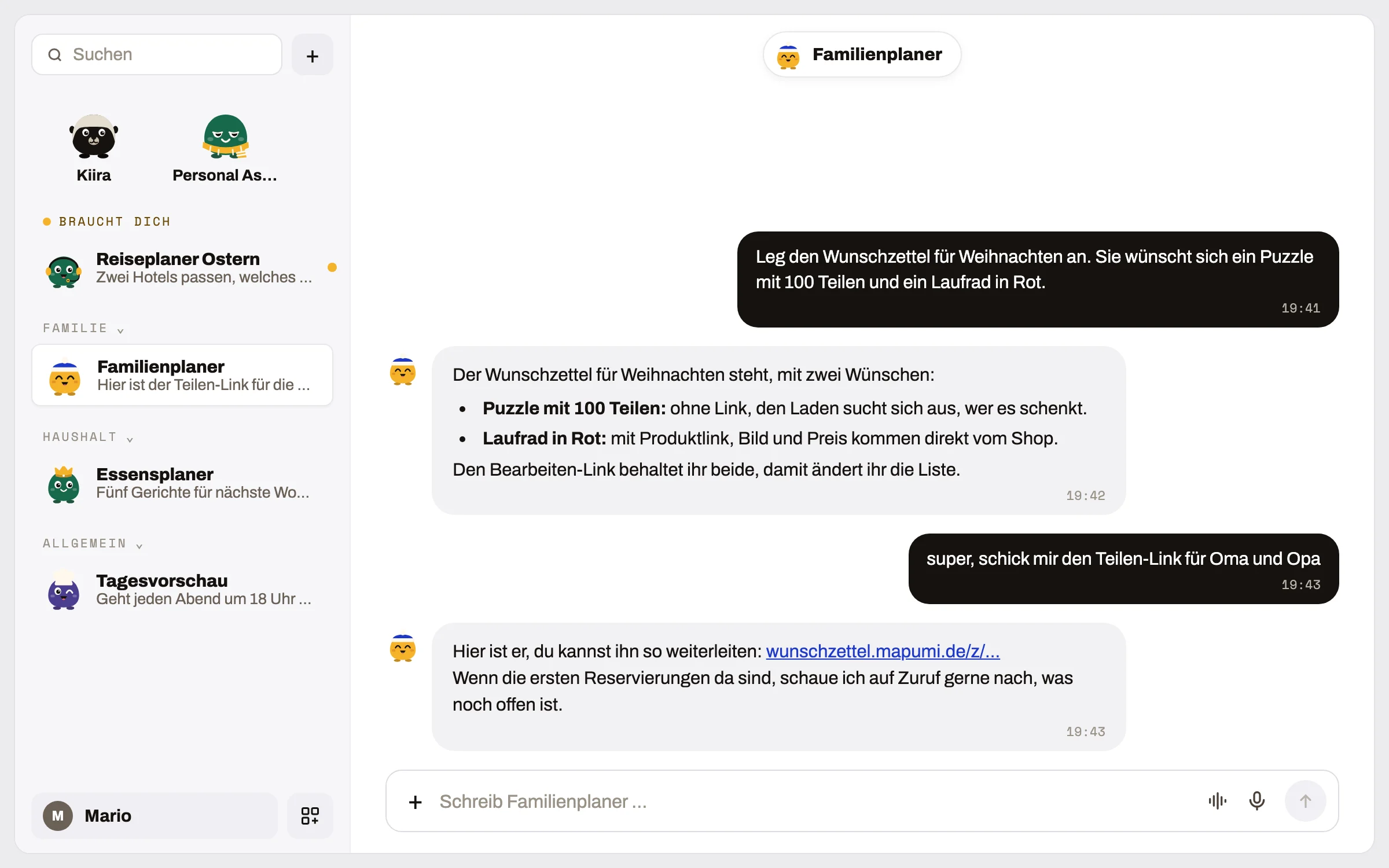
Every year before Christmas the family asks the same question: what would she like? This time I simply wrote to my assistant: “Create the wish list for Christmas.” You write the occasion in freely, and it works just the same for a birthday.
A few seconds later there were two links. My partner and I keep the secret edit link and use it to change the list. The family gets the share link. Grandma and Grandpa look at it, tap “I’ll give this” on a wish, and the others can see it is taken. Nothing turns up twice.
The nice part is what happens afterwards. When our daughter talks about a new wish at dinner, I quickly write it in the chat and the assistant adds it. And when I ask what is still free, it knows what has already been reserved.
We decide what goes on the list and who gets the link.
You can also use the mapumi wish list without kiimu. It is free and needs no account: wunschzettel.mapumi.de. How exactly it works is explained in our guide Wish list for kids.
Children's birthday party: invitation with replies via a link
A children's birthday party is made up of a surprising number of small things. For this there is now the mapumi invitation, free and without an account: mapumi.de/einladung. You enter the first name, date and place, add the guests, and every invited child gets their own link.
- Yes and no replies come in with a tap, and your overview shows who is coming
- the guests' parents can mention allergies, whether siblings are coming along and who is collecting
- your wish list is linked directly in the invitation
- notes such as “bring waterproof trousers” are included right away
One point was especially important to me. I did not want a QR code on a notice at the nursery door that anyone could scan. Instead you print personal cards with a QR code, only for the children who are actually invited. Guests only see your address after they say yes, only you see the guest list, and everything is deleted 30 days after the party.
As with the wish list, the assistant can do the work here too. For example, you write: “Lina is turning five, we are celebrating on Saturday from 3 to 6 pm at our home, and Mia, Ben and Lotta are invited.” It creates the invitation, links the wish list and gives you the links for the guests. Later you simply ask who has already said yes and whether anyone has mentioned an allergy.
A bring list, where everyone enters what they are bringing, is still being planned at mapumi.
The week's meals get planned on Thursday
Every Thursday a small meal planner suggests five dishes for the coming week. It knows our rules without me having to explain them every time.
There are only healthy dishes. On Tuesdays there is always pasta with lentil and tomato sauce. Once a week is a cold supper with bread. It plans all the other dishes for six portions so that my partner and I can take the leftovers for lunch. And the recipes work with the Thermomix.
If I don't like something, I write back: “No fish this week.” The plan adapts, and I look at it once more.
In the end I give the plan the nod. Only then does it move on to the shopping.
The basket is full, you place the order
From the finished plan, the assistant fills the basket at the grocery delivery service. Here in Austria that is Gurkerl, for example. It knows which organic brands we buy on purpose and does not swap them for a cheaper own brand just because that is on offer.
Before ordering, I get a short price check. That way I can see at a glance whether anything is out of the ordinary this week.
Toothpaste, shampoo or sun cream do not end up in the grocery basket but on a separate list for the chemist.
We always place the order ourselves. The assistant prepares everything, and we make the final tap.
To be honest: the meal planner and the basket run for me as my own small setup. In kiimu they are not yet a finished feature that you can simply switch on.
Agreeing on appointments without five messages back and forth
Take the parents' evening at school. The school sends a few time slots to choose from, and my partner and I used to put both our calendars side by side in the evening. Now my assistant looks at both calendars and suggests the slots that suit us both. It only adds the appointment once I say yes.
What helps me most, though, are the reminders that come at the right moment. Half an hour before an important call. The day before the library return date, for which a photo of the loan slip is enough. Or shortly before the free cancellation period at the holiday hotel runs out, so we can still decide calmly.
Each person decides for themselves who can see what. Maybe someone should only see whether you are free or busy. Maybe the appointment titles too.
This also runs in my own setup with our two calendars. kiimu already connects to Google Calendar today, but matching calendars between two people is not finished there yet.
When the assistants talk to each other (coming soon)
This is what I am looking forward to most. My partner and I each have our own assistant, and the two of them should agree on many things directly with each other. Who is doing the shopping this week? Who is doing pick-up on Thursday? Are we both free on Saturday for the day trip?
This is how it should work: I take a photo of the list of borrowed books and send it to my assistant. It passes it on to my partner's assistant, which shows it to her with a short note and confirms receipt. Neither of us has to write a separate message.
The assistants pass on personal messages word for word. If I write something personal for my partner, exactly that sentence reaches her and does not get stuck somewhere between two bots.
The assistants only bring us in when something needs to be decided. Everything else they sort out between themselves.
To be honest, this is not finished yet. My co-founder and I are building it right into kiimu at the moment. Until then, each assistant handles the tasks of its own person.
You stay in control
Before the assistant sends an email, kiimu shows you a card. You see what is about to go out and approve it with one tap. You do the ordering and booking yourselves; the assistant only prepares.
Your kiimu workspace is hosted by a provider in Vienna. The answers themselves are written by the AI model from your own subscription, for example Claude. More on this on the kiimu security page.
And you decide for each person who is allowed to know what. The grandparents do not need to know when your dentist appointment is, and your partner does not need to be able to read every call in your calendar.
What kiimu is not
kiimu does not replace conversations within the family. Whether we go away in the holidays or how much screen time is okay is something my partner and I discuss with each other. At most, the assistant can make sure we have a little more time for that.
It makes no decisions about children, and it does not buy anything itself.
How you can get started
It is best to start with the free wish list. It needs no account, takes a minute to create and shows you what it feels like when a piece of organisation takes care of itself. If a children's birthday party is coming up, the invitation is just as quick to create.
If you would like to try kiimu: the form on kiimu.at is currently built for teams and asks for a company and a work email. As a family, the easiest way is to write to me directly at mario@kiimu.at. My co-founder and I usually reply within a day and set up the first use together with you in a short 15-minute call. Remember the AI subscription, for example from Claude; you will need it for this.
And if you also sit on the sofa with your calendar on a Sunday evening: what takes up the most time for you? Feel free to tell me via the contact page.
Frequently asked questions
What is kiimu?
A personal AI assistant for each person, which you write to in a chat. It takes care of small jobs like the wish list. Before it sends an email, you approve it with a tap. kiimu comes from Vienna and is currently in a closed beta.
Does kiimu order or book anything without us?
No. The assistant prepares things, for example the basket at the grocery delivery service. You do the ordering and booking yourselves.
Do I need kiimu for the wish list?
No. You can use the mapumi wish list directly, free and without an account. With kiimu you simply add wishes in the chat.
What do I need to use kiimu?
Beta access and an AI subscription you already have, for example from Claude. As a family, the easiest way is to write to mario@kiimu.at. We set up the first use together with you in 15 minutes.